
Migrate Your Website to WordPress: Guide for UK Businesses
Learn how to migrate website to WordPress quickly and securely. Discover best practises for UK businesses and explore your seamless migration options today.
Want to make your Microsoft 365 work harder for your business?
and we’ll tailor a solution that’s just right for you.
Migrating your website to WordPress can feel overwhelming, especially when you’re juggling tight deadlines, business operations, and the fear of something going wrong. It’s normal to worry about downtime, broken links, lost content, or unexpected technical issues, and these concerns can weigh heavily on anyone responsible for keeping a website running smoothly.
In 2023, UK businesses experienced over 50 million hours of disruptive downtime, leading to an estimated £3.7 billion in losses. Migration mishaps like missing media, database errors, and broken links are often behind these disruptions. On top of that, 46% of data loss incidents in 2024 were caused by cyberattacks, highlighting the importance of robust security throughout the process.
This guide is designed to address these challenges head-on. We’ll walk you through a clear, step-by-step approach to migrating your website to WordPress safely and efficiently, helping you protect your data, maintain SEO performance, and minimise disruption so you can move forward with confidence.
Key Insights:
- Choose a Migration Method That Fits Your Website: Plugin-based migration works best for small to mid-sized sites needing speed and simplicity. Manual migration suits larger or custom sites requiring precision, control and compliance.
- Preparation Prevents Data Loss and SEO Issues: Full backups, content audits, hosting checks and documenting SEO settings ensure a smooth migration without errors or lost content.
- Treat Migration as a Process, Not a Single Action: Following a defined workflow that includes setup, transfer, validation and testing reduces the risk of downtime and prevents last-minute surprises.
- Optimisation After Migration Is Just as Important as the Move Itself: Updating permalinks, fixing broken links, reapplying SEO settings, testing mobile layouts and tightening security helps your WordPress site perform at its best from day one.
Why Upgrading to WordPress Makes Business Sense
For many UK businesses, migrating a website can feel like a big task, but the advantages of moving to WordPress make it worthwhile. Older platforms can be slow, difficult to update, and often limit what your site can do. WordPress provides a flexible and scalable solution that grows with your business, whether you are a small SME or a larger organisation. Here are the main reasons to consider migrating:
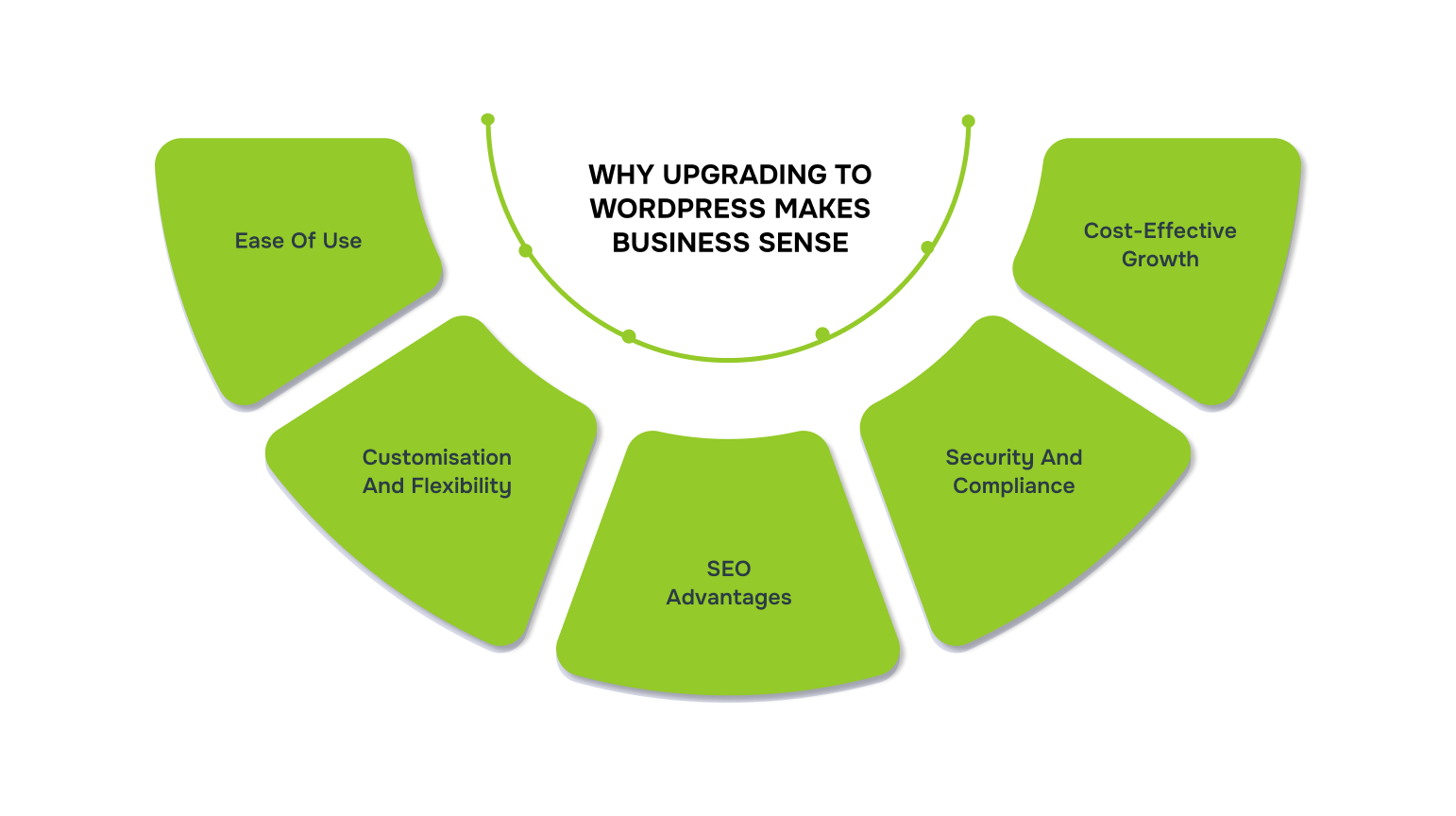
- Ease of Use: WordPress has an intuitive interface, making it simple for marketing teams or content creators to update pages, blogs, and media without waiting for a developer.
- Customisation and Flexibility: Thousands of themes and plugins allow you to shape your site to match your brand and functional needs without complicating the backend.
- SEO Advantages: WordPress is built with search engines in mind. Plugins like Yoast SEO make it easy to manage metadata, improve site speed, and boost search visibility.
- Security and Compliance: Regular updates, SSL support, and careful plugin management help protect your site and keep it aligned with UK data regulations.
- Cost-Effective Growth: Compared to many proprietary platforms, WordPress is more affordable over time while supporting a scalable website as your business expands.
Switching to WordPress makes it easier to manage your website, improve the experience for visitors, and increase engagement. For UK businesses looking to modernise their online presence, WordPress is more than just a content management system. It is a reliable tool to support growth and future-proof your site.
Once you’ve decided WordPress is the better platform, the next question is: what’s the fastest and safest way to get there?

Also Read: How to Make a WordPress Website? A Step-by-Step Guide
Fast and Reliable Ways to Migrate to WordPress
When it comes to moving your website to WordPress, there are two main approaches: using migration plugins or manual migration. Understanding both methods will help you decide which is the best fit for your business, your website’s complexity, and your team’s technical expertise.
1. Using Migration Plugins
Migration plugins are designed to make the transfer process faster and easier. They are particularly helpful for small to medium-sized websites or for businesses that want to avoid technical hassles. Essentially, these plugins handle most of the work behind the scenes, from transferring files to updating links. Here’s why using a migration plugin can be the right choice:
- Faster Process: Transfers can often be completed in a fraction of the time compared to manual methods.
- Minimises Errors: Automates updates for URLs, permalinks, and media links, reducing the chance of broken pages.
- No Technical Expertise Needed: Makes the process accessible for teams without in-house developers.
- Preserves Site Structure: Maintains your existing design, plugins, and settings without disruptions.
- Handles Backups Automatically: Many plugins create a full backup of your website, providing an extra layer of security.
- Simplifies Testing and Rollback: Some plugins allow you to test the migrated site before going live and restore previous versions if needed.
- Reduces Downtime: Well-managed plugin migrations can keep your website live or minimise the downtime during the transition.
- Compatible with Hosting Providers: Most popular plugins work with a wide range of UK hosting providers, making the process smoother.
By choosing a migration plugin, businesses can save time, reduce risks, and ensure that the move to WordPress is as smooth as possible.
Popular plugins:
- All-in-One WP Migration: Handles both small and moderately large websites, including databases, themes, plugins, and media.
- Duplicator: Creates a full site package for smooth import to WordPress.
- WP Migrate DB: Focuses on database transfer, ideal for sites with heavy content.
Watch These Risks Before You Migrate:
- Some plugins have size limits on free versions.
- Always create a full backup before using a plugin.
- Test your site after migration to ensure everything works correctly.
2. Manual Migration
Manual migration is a more hands-on approach. It gives full control over the transfer and is often used for larger websites, custom-built platforms, or businesses with specific requirements. While it takes more time and technical knowledge, it ensures nothing is left behind and allows for precise adjustments. Here’s why manual migration may be the right choice:
- Complete Control: You manage every aspect of the migration, ensuring each file, database entry, and setting is handled correctly.
- Ideal for Complex Sites: Perfect for websites with custom features, large databases, or advanced functionality.
- Custom Server Configurations: Works well when your site has unique server requirements or security protocols.
- Ensures Data Accuracy: Reduces the risk of missing content or broken links, as everything is migrated manually.
- Better for Compliance: Allows careful management of sensitive or regulated data, which is especially important for UK businesses in sectors like finance, healthcare, or education.
- Optimises Performance: Gives you the chance to review and clean up old files or plugins, improving site speed and efficiency.
- Flexible Migration Timeline: You can plan the migration in stages, minimising disruption to your users.
- Detailed Testing Opportunity: After migration, every element can be tested and adjusted for optimal performance before going live.
Manual migration is a more detailed and controlled approach, making it the preferred method when precision, compliance, or customisation is a priority.
Watch These Risks Before You Migrate:
- Requires technical skills, particularly for database management.
- Time-consuming, especially for large websites.
- Mistakes can lead to downtime or broken pages if not carefully managed.
Both approaches have their advantages and considerations, so choosing the method that aligns with your website’s complexity, business needs, and team capabilities will ensure a successful migration to WordPress.
Once you understand the main methods for migrating your website, the next step is to follow a clear, step-by-step process to ensure the move is successful.
Also Read: WordPress 6.8 “Cecil” Update: What’s New and How It Impacts Your Website
Step-by-Step Process to Migrate Your Website to WordPress
Migrating a website can seem complex, but breaking it down into clear, manageable steps ensures a smooth transition. Below is a detailed guide covering preparation, migration, and post-migration activities.
1. Pre-Migration Checks
Before you move your website, proper preparation is essential. Pre-migration checks help you identify potential issues, protect your data, and plan the migration efficiently. Skipping this step can result in lost content, broken links, or unnecessary downtime. Here’s what UK businesses should focus on before migration:
- Full Website Backup: Before starting, create a complete backup of your existing website. This includes all files, databases, images, plugins, and configurations. A backup acts as a safety net. If anything goes wrong during the migration, you can restore your website to its previous state without losing data. UK businesses should especially ensure that backups comply with GDPR requirements when handling customer data.
- Content Audit: Review all your pages, posts, images, and plugins. Identify content that should be updated, removed, or left unchanged. This step ensures that only relevant content is migrated, reducing clutter and improving website speed. It also allows you to optimise content for SEO and user experience during the migration.
- Hosting Environment Check: Verify that your new hosting server supports WordPress. This includes checking PHP version compatibility, MySQL/MariaDB support, available storage, and SSL certificates. Ensuring compatibility ahead of time reduces errors during migration and avoids potential downtime for UK visitors.
- SEO Review: Document your current SEO setup: meta titles, descriptions, URL structure, redirects, and backlinks. Maintaining SEO ensures that your website doesn’t lose search engine rankings after migration. For UK businesses, keeping Google UK and Bing indexing in mind is crucial.
- Plan the Migration Timeline: Schedule the migration during off-peak hours to reduce the impact on visitors and business operations. Planning ensures minimal downtime and allows your team to monitor and address any issues promptly.
2. Migration Steps
Once your website is prepared, the actual migration can begin. The process differs depending on whether you choose plugin-based migration or manual migration. Each approach has its advantages and is suitable for different scenarios. This section explains both methods in a practical way so UK businesses can select the approach that fits their needs.
A. Using Migration Plugins
Using a migration plugin is often the fastest and simplest method. It’s ideal for small to medium-sized websites or businesses that want to minimise technical challenges. Plugins handle most of the heavy lifting, including moving files, databases, and updating links. Here’s what the process looks like:
- Install the Plugin: Choose a reliable plugin such as All-in-One WP Migration or Duplicator. These plugins automate most of the migration process.
- Export Your Website: Use the plugin to create a full copy of your website, including all files, themes, plugins, and databases. This ensures nothing is left behind during the transfer.
- Install WordPress on the New Server: Set up a clean WordPress environment on your new hosting platform. This provides a blank canvas for your migrated website.
- Import Your Website: Upload the exported files into WordPress using the plugin. The plugin will automatically update URLs, media links, and permalinks.
- Verify the Migration: After importing, review all pages, posts, and media to ensure everything has been transferred correctly. Check for broken links or missing content.
Using plugins reduces migration time and makes it manageable even without a dedicated technical team.
B. Manual Migration
Manual migration requires a more hands-on approach and is best for larger websites, custom-built platforms, or businesses with specific technical requirements. While it takes more time and effort, it gives complete control over the process and ensures nothing is overlooked. Here’s what the process looks like:
- Set Up WordPress: Install a fresh WordPress instance on your hosting server. This gives you a clean environment to work with.
- Transfer Website Files: Move your website’s themes, plugins, and media files using FTP or your hosting control panel. This step ensures all functional elements are available on the new site.
- Migrate the Database: Export your website’s database from the old server and import it into WordPress using phpMyAdmin. Ensure all tables and relationships are preserved to avoid content loss.
- Update Configuration: Edit the wp-config.php file to connect your WordPress installation to the new database. Adjust site URLs and other configuration settings as needed.
- Check Everything: Review the website thoroughly: test pages, forms, plugins, and media. Make sure all features work correctly before going live.
Even with careful preparation, website migration can present technical hurdles, from preserving SEO and site functionality to ensuring smooth hosting compatibility.
Alberon helps businesses overcome these challenges effortlessly with end-to-end support, including full website backups, content audits, hosting environment checks, and post-migration optimisation. With capabilities in Microsoft 365, SharePoint, Dynamics 365, and custom software solutions, the migration process remains secure, fully functional, and optimised throughout. This allows businesses to focus on growth while the website moves to WordPress seamlessly.
Talk to our team today to get started.

Before you begin the detailed migration steps, it’s essential to follow some reliable preparatory practises to ensure a smooth and error-free transition to WordPress.
Also Read: Complete Guide on Microsoft Office 365 WordPress Integration
Reliable Practises Every Business Should Follow Before Migrating
Completing a website migration is only part of the journey. Ensuring your WordPress site runs smoothly, maintains SEO value, and provides a seamless user experience requires careful testing and optimisation. Following these best practises helps UK businesses minimise downtime, protect data, and preserve search rankings.
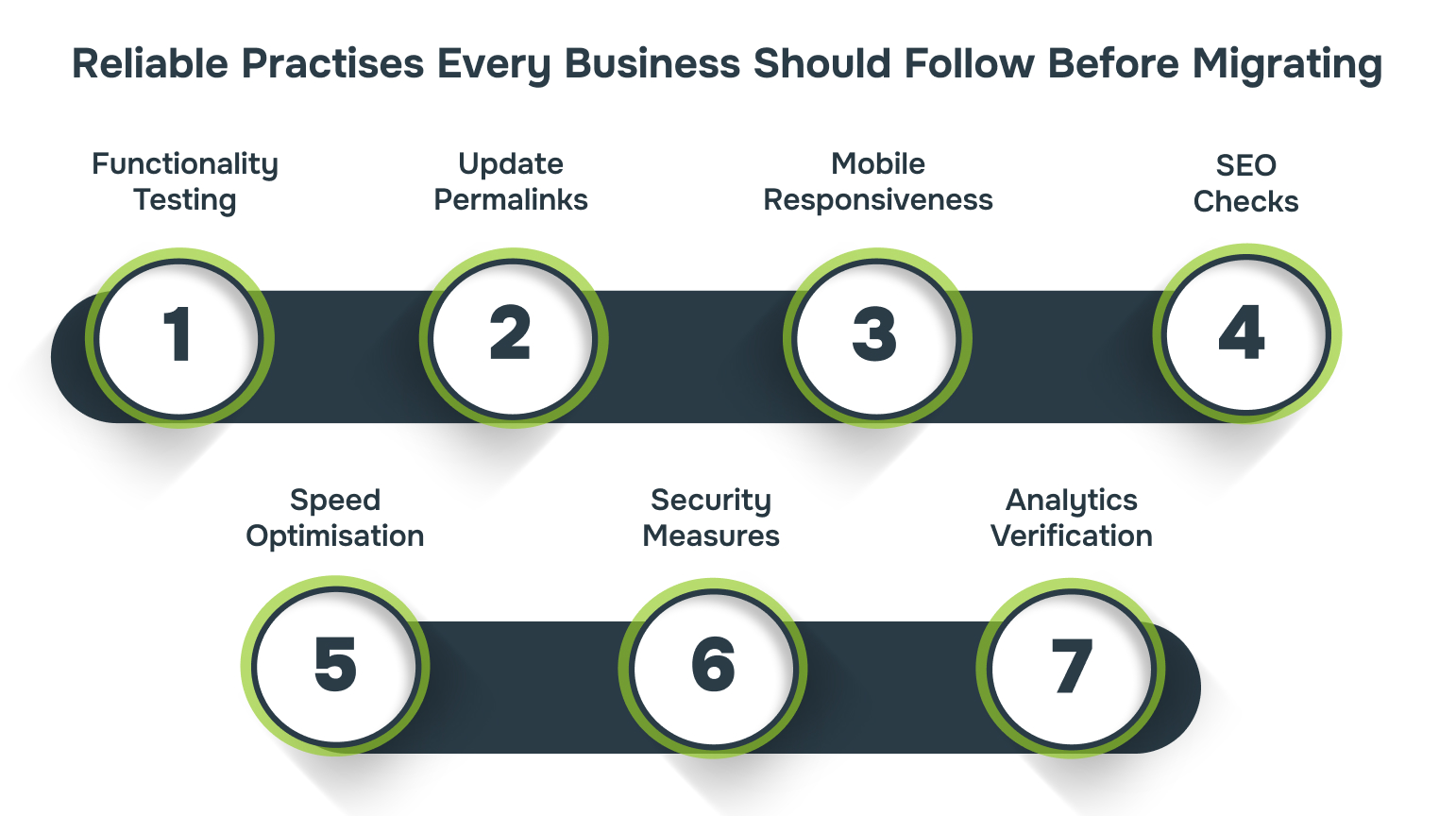
1. Functionality Testing
Don’t assume everything carried over perfectly. Manually test every page, link, contact form, button, and plugin feature. Try submitting a form, playing a video, or downloading a file like a user would. This step helps catch hidden issues such as broken links, missing media, or malfunctioning scripts before your visitors notice them.
2. Update Permalinks
WordPress allows you to customise your URL structure. Make sure your new URLs either match your old format or follow an SEO-friendly style such as yourdomain.com/blog/sample-post/. After updating, test multiple links to ensure there are no 404 errors.
3. Mobile Responsiveness
With over 60% of UK web traffic coming from mobile, your site must adapt seamlessly to all screen sizes. Test it on different devices such as iPhone, Android, iPad, and laptops, as well as different browsers. Look for overlapping text, broken layouts, or slow-loading images.
4. SEO Checks
Reapply essential SEO elements such as meta titles, descriptions, header tags, image alt texts, and internal links. If your URLs changed during migration, ensure proper 301 redirects are in place to preserve rankings. Also, resubmit your sitemap in Google Search Console and Bing Webmaster Tools so search engines can reindex your updated site quickly.
5. Speed Optimisation
Migration can sometimes slow things down due to outdated plugins or large uncompressed files. Clear cache files, compress high-resolution images, and disable plugins you no longer need. Use tools like Google PageSpeed Insights or GTmetrix to check your loading time and make necessary improvements.
6. Security Measures
Activate your SSL certificate so your site displays a padlock symbol. Install a trusted security plugin such as Wordfence or Sucuri, and set up automated backups. If you store customer or financial data, ensure your setup complies with GDPR and UK Data Protection laws.
7. Analytics Verification
Make sure Google Analytics or your preferred tracking tool is properly installed and receiving data. Without tracking, you won’t know whether traffic has increased, dropped, or bounced after migration, and you may miss early warning signs of technical issues.
Following these detailed steps ensures that UK businesses can migrate their websites confidently to WordPress, minimise risks, maintain SEO performance, and deliver a seamless experience to users.
With a solid preparation plan in place, the next step is choosing the right partner to guide and support your website migration and broader digital projects.
Why Partner with Alberon for Your Website and Digital Projects
Migrating a website involves more than just moving files; it requires careful planning, technical expertise, and optimisation to maintain performance and user experience. While WordPress migration is just one part of a digital journey, Alberon helps UK businesses tackle the broader challenges of website and system improvement.
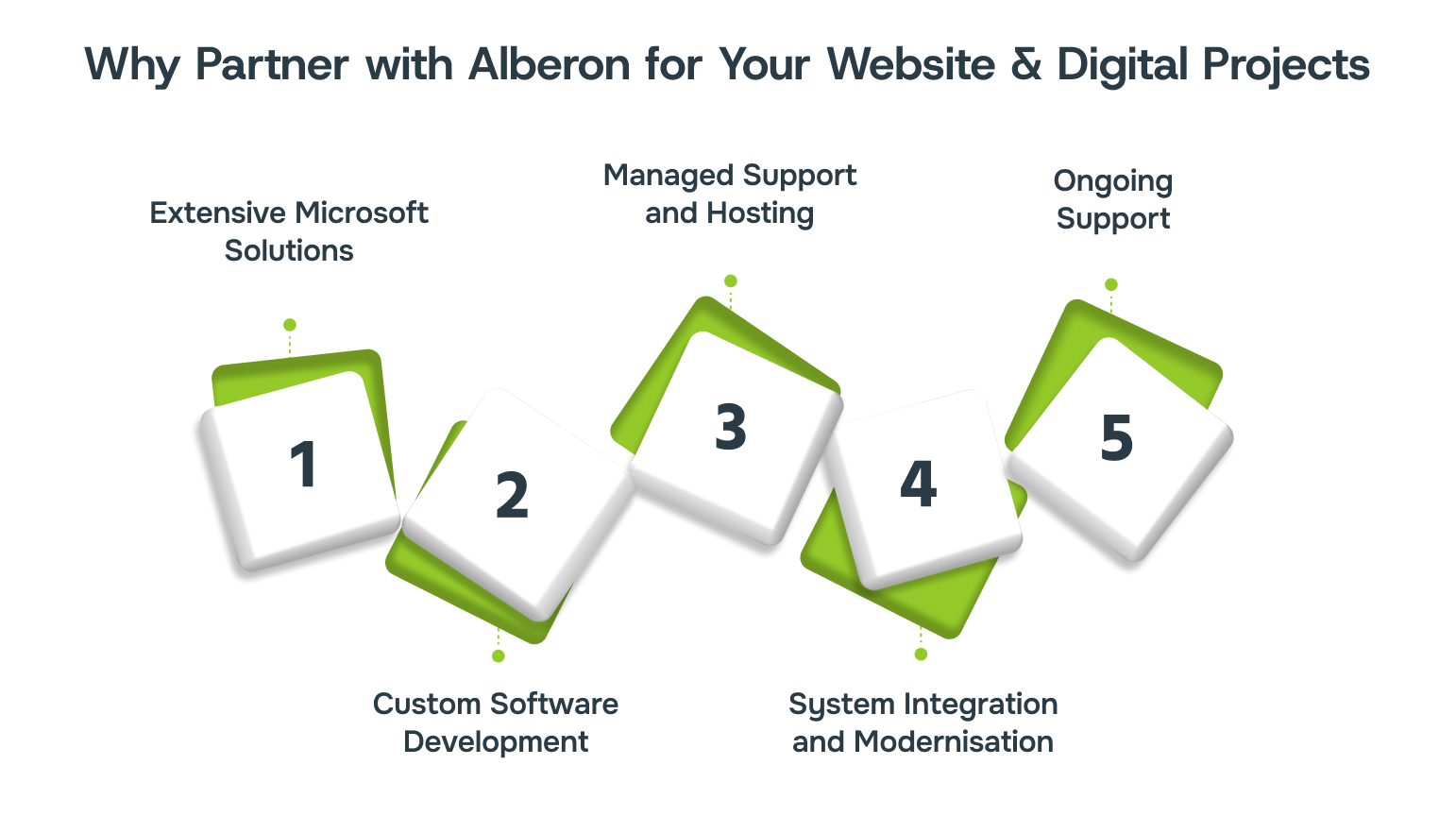
Here’s how Alberon supports your digital projects:
- Extensive Microsoft Solutions: From Dynamics 365 to Microsoft 365 optimisation and SharePoint services, businesses can simplify operations, improve collaboration, and enhance productivity.
- Custom Software Development: Bespoke web applications and tailored software solutions ensure technology aligns perfectly with business goals.
- Managed Support and Hosting: With managed web hosting, ongoing support, and cybersecurity training, websites and digital platforms remain secure, fast, and reliable.
- System Integration and Modernisation: We connect your existing tools and platforms seamlessly, making your digital infrastructure more cohesive.
- Ongoing Support: From planning to post-launch monitoring, our team ensures that your website and systems continue to perform at their best.
Partnering with the right experts ensures businesses gain a strategic ally who understands the complexities of digital projects while prioritising efficiency, security, and growth.
Partner with Alberon and confidently approach website migrations or broader digital projects with a trusted team that prioritises efficiency, security, and long-term growth.
Conclusion
Migrating your website to WordPress doesn’t have to be overwhelming. With careful preparation, the right approach, whether using migration plugins or a manual transfer and post-migration optimisation, UK businesses can maintain SEO performance, minimise downtime, and deliver a seamless experience to their visitors.
Partnering with Alberon ensures you have expert guidance throughout the process. From planning and system assessment to ongoing support and optimisation, Alberon helps businesses approach digital changes with confidence and precision.
Ready to make your website migration smooth and secure? Book a consultation with Alberon today to discuss how we can support your digital journey.
FAQs
1. Will my SEO rankings drop after I migrate my site to WordPress?
Not necessarily. If you preserve URL structures or implement correct 301 redirects, submit updated sitemaps, and monitor indexing in Google Search Console, you can avoid significant ranking loss.
2. How long does a typical migration take?
Small, static sites can be migrated in a few hours using a migration plugin; medium or complex sites (lots of pages, databases, custom functionality or eCommerce) usually take several days for migration, testing and fixes. Plan extra time for QA and SEO checks.
3. Will my design or content need to be rebuilt on WordPress?
Not always. Content and themes can often be migrated intact, but bespoke layouts or paid/closed-source widgets may need re-implementation or replacement on WordPress. Treat migration as an opportunity to tidy and optimise rather than a straight copy-paste.
4. Which tools or plugins are recommended for a fast, low-risk migration?
Popular, trusted options include All-in-One WP Migration, Duplicator, Migrate Guru and host-provided migration tools. For major moves, combine a plugin with a staging site and backups so you can test and roll back if needed.
5. Can I migrate from hosted builders (Wix, Squarespace, HubSpot) to WordPress?
Yes, but these moves are often more involved: you usually export content (or use platform-specific exporters/importers) and rebuild templates in WordPress. Expect manual fixes for design, forms and integrations.
6. How do I avoid downtime and broken links during the switch?
Use a staging environment, test the full site there, set up and test 301 redirects, and perform the final DNS change during off-peak hours. Monitor the live site and search indexing immediately after the switch.
Ready to Improve your Business Productivity
Get a trusted partner to navigate your digital transformation. With Alberon, you can ensure a smooth transition, clear communication, and peace of mind.