
Understanding CRM in Microsoft Dynamics 365
Transform your business with CRM for Microsoft. Discover AI insights, centralised data, and seamless integration. Unleash potential today!
Want to make your Microsoft 365 work harder for your business?
and we’ll tailor a solution that’s just right for you.
Is your CRM helping your business or holding it back? For companies that rely on Microsoft 365, Outlook, or Teams, choosing the right CRM isn’t just about features. It’s about fit. A well-aligned CRM improves communication, supports daily workflows, and reduces manual effort across teams.
Microsoft’s CRM includes Dynamics 365, Power Platform tools, and custom solutions that integrate directly into your existing systems. The flexibility is there, but so are the trade-offs. Off-the-shelf tools may launch quickly but often miss the mark. A custom solution takes more time but delivers long-term efficiency, better data control, and tighter integration.
In this guide, we’ll explore what “CRM for Microsoft” really means, which options are available, and how to decide what’s right for your business. We’ll break down the development process, share practical examples, and explain where bespoke CRM delivers the strongest value.
Key Takeaways
- A Microsoft-aligned CRM integrates directly with tools like Outlook, Teams, and SharePoint, streamlining workflows and reducing duplication.
- Dynamics 365 provides a flexible foundation but often requires tailoring to match real-world business processes.
- Bespoke CRM solutions offer stronger alignment with unique operations, delivering better data control, automation, and long-term value.
- The Microsoft Power Platform enables custom functionality, but complex use cases typically require professional development support.
- The right CRM choice depends on how specific your workflows are, what systems you already use, and your long-term digital strategy.
Understanding CRM in Microsoft Dynamics 365
Microsoft Dynamics 365 is a suite of business applications that includes several CRM modules. These tools are designed to manage customer relationships across sales, service, and marketing, while working directly with Microsoft 365 tools like Outlook, Teams, and SharePoint.
Dynamics 365 is modular. Businesses can choose the applications they need such as sales, customer service, or Marketing and integrate them into existing systems. This allows teams to track customer interactions, manage pipelines, and automate communication within a familiar Microsoft environment.
The platform also connects with Power Platform tools like Power Automate and Power BI. This allows for low-code automation, reporting, and custom workflows tailored to your business.
For organisations already using Microsoft products, Dynamics 365 offers a consistent user experience and easier integration. But to get the most value, the system often needs to be configured or fully customised to match your processes.
Many businesses begin with standard Dynamics 365 modules expecting a complete solution, only to find gaps in fit or functionality over time. Looking at the broader CRM options within Microsoft’s ecosystem can help you decide what works best for your setup, now and as your needs evolve.

Microsoft CRM Options And Ecosystem
Microsoft provides a range of CRM options to suit different business needs, from standard modules in Dynamics 365 to fully customised solutions built on its development tools.
1. Dynamics 365 CRM Modules
Dynamics 365 includes modular applications for:
- Sales – Track leads, manage opportunities, and support sales pipelines.
- Customer Service – Handle cases, monitor performance, and improve response times.
- Field Service – Manage technicians, appointments, and service delivery in the field.
- Marketing – Automate campaigns, segment audiences, and analyse engagement.
These modules work together or independently, depending on how your business is structured.
2. Power Platform and Microsoft Dataverse
The Power Platform allows businesses to extend CRM functionality using low-code tools:
- Power Apps – Build custom interfaces to collect, view, or manage customer data.
- Power Automate – Automate repetitive tasks or integrate data between systems.
- Power BI – Turn CRM data into actionable dashboards and reports.
All three tools connect to Microsoft Dataverse, a shared data layer that ensures consistency across applications.
3. Custom CRM Solutions Built on Microsoft Stack
For organisations with unique processes, fully tailored CRMs can be developed using:
- NET, Azure Functions, and SQL Server for backend logic and scalability
- Direct integration with Microsoft 365 for consistent user experience
- Custom-built workflows, reporting, and security controls
These solutions are designed around your business, offering more flexibility than standard configurations.
4. Third-Party CRMs with Microsoft Integration
Platforms like Nimble, HubSpot, and Zoho offer integration with Microsoft 365. These tools can connect with Outlook or Teams but may have limited flexibility when it comes to complex business needs or data control.
Once you understand these options, the next question is: which of them delivers real business value?
Out-of-the-box tools offer a fast start, but they rarely adapt well to growth or complexity. For businesses that rely on unique workflows and need scalable systems, bespoke solutions offer a better fit.
Alberon specialises in developing Microsoft-aligned CRM systems, tailored for integration, built for scalability, and designed to deliver long-term value.
Key Benefits of Choosing CRM for Microsoft
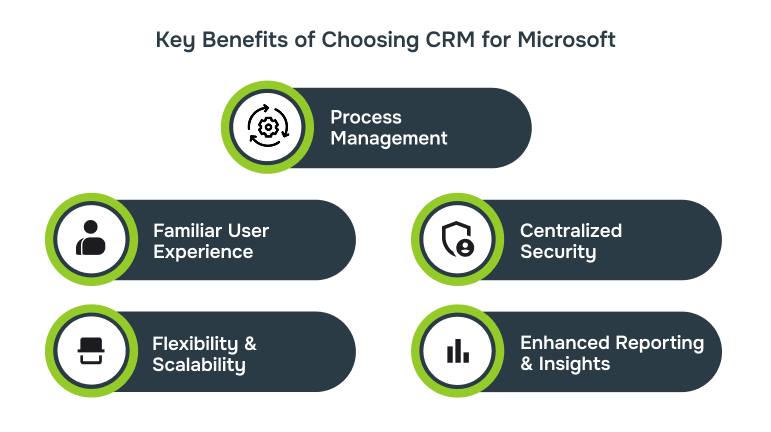
Choosing a CRM that fits within the Microsoft ecosystem offers more than convenience. It supports stronger collaboration, improves data flow across departments, and gives your teams tools they already know how to use.
Here are the key advantages:
1. Seamless Integration with Microsoft 365
A Microsoft-aligned CRM connects directly with familiar tools, Outlook, Teams, SharePoint, and OneDrive. This means customer data, communication history, and tasks are accessible in one place, reducing duplication and manual effort.
2. Familiar User Experience
Users already working in Microsoft 365 will find the interface intuitive. This shortens onboarding time, improves adoption, and reduces training requirements across teams.
3. Centralised Identity and Security
CRMs that run on Microsoft infrastructure use Azure Active Directory, enabling single sign-on (SSO), role-based access, and consistent compliance policies across systems.
4. Flexibility and Scalability
Businesses can start with standard modules and expand as needs change. Through the Power Platform or custom development, new features can be added without rebuilding the system.
5. Better Reporting and Insights
With Power BI integration, teams can create custom dashboards and reports using live CRM data, improving decision-making and visibility across the business.
While the benefits are clear, getting the most out of a Microsoft-aligned CRM depends on careful planning. From licensing complexity to integration challenges, there are important factors to consider before making a decision.
Challenges & Considerations
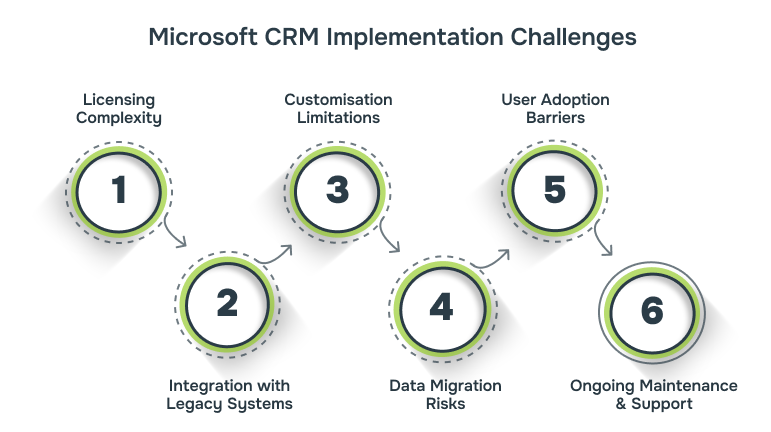
While Microsoft’s CRM ecosystem is flexible and feature-rich, it comes with practical challenges, especially for businesses with complex systems or evolving requirements. Understanding these early can prevent delays and unexpected costs.
1. Licensing Complexity
Microsoft’s licensing structure can be difficult to navigate. Dynamics 365 apps are licensed separately, with added costs for automation, analytics, or external integrations. Without careful planning, businesses may overpay or miss essential features.
2. Integration with Legacy Systems
Older systems often require custom connectors or third-party middleware. Even within Microsoft’s ecosystem, integration between on-premises databases and cloud-based apps may involve additional configuration or data migration planning.
3. Customisation Limitations
Out-of-the-box tools cover standard use cases, but advanced workflows often require more than what Power Platform or Dynamics modules offer. Over-customising packaged tools can create technical debt and upgrade issues down the line.
4. Data Migration Risks
Moving data from spreadsheets, legacy CRMs, or disconnected systems can be complex. Without a clear strategy, businesses risk losing data integrity, duplicating records, or introducing inconsistencies that affect performance.
5. User Adoption Barriers
Even with a familiar interface, a poorly implemented CRM can lead to low user adoption. If the system doesn’t match how teams actually work, staff may revert to old habits, reducing the return on investment.
6. Ongoing Maintenance and Support
Microsoft releases regular updates across Dynamics, Power Platform, and Azure. These updates can affect performance, compatibility, or custom features, requiring ongoing monitoring and support to ensure stability.
When Does a Bespoke CRM Make Better Business Sense?
Most businesses start with packaged CRM tools. They’re easy to launch and offer a wide set of features. But as operations grow more complex, these systems often start to show their limits, especially when they can’t match how your teams actually work.
In these situations, a bespoke CRM built on Microsoft technologies often becomes the smarter choice.
1. Your Processes Don’t Fit the Standard Model
If staff is adapting their workflows to fit the software or relying on work arounds the system is slowing you down, not helping you operate better.
Questions to ask:
- Are we using manual processes outside the CRM to complete key tasks?
- Have we had to restructure operations to work around system limitations?
- Do users avoid certain features because they don’t match how the team works?
2. You’re Planning for Growth
Most off-the-shelf systems are built for typical business sizes and workflows. But if your business is growing, merging, or evolving, the CRM must be able to keep up.
Questions to ask:
- Will this CRM still meet our needs in 12 to 24 months?
- Can it support multiple departments, user roles, or service lines?
- Will new functionality require major rework—or can we build on what exists?
3. Integration with Other Systems Is Critical
If your CRM is disconnected from core platforms like finance tools, case management software, or scheduling systems data silos start to build. A bespoke CRM can be built to integrate directly with what you already use.
Questions to ask:
- Are we entering the same data in multiple systems?
- Is reporting slowed down because systems don’t communicate?
- How often are errors caused by disconnected tools?
4. You Need Control Over Features and Data
With a custom-built CRM, your business decides how the system works and how your data is stored and used. You’re not limited by third-party licensing, development timelines, or missing features.
Questions to ask:
- Are we relying on a vendor’s roadmap for critical features?
- Do we need to modify the system beyond what current tools allow?
- Would owning the platform give us a competitive or compliance advantage?
5. Compliance and Security Are Non-Negotiable
Industries handling sensitive data such as legal, healthcare, education, or finance need more control over security, access, and audit trails. A bespoke CRM lets you design for compliance from the start.

Questions to ask:
- Can we control exactly who sees what data and when?
- Are audit trails, backups, and data handling aligned with policy?
- Would a custom system help us meet external or regulatory standards more easily?With the advantages of bespoke CRM established, the next step is to see how Alberon’s solutions translate those benefits into real-world business efficiency.
How Alberon’s Bespoke CRM Solutions Enhance Your Business Efficiency?
At Alberon, we design bespoke CRM systems that do more than manage contacts, they support how your business works. Every solution is built around your internal processes, integrates with your existing tools, and helps your teams work more efficiently.
By building on Microsoft technologies, we ensure that your CRM fits seamlessly into your existing environment whether that’s Microsoft 365, Teams, SharePoint, or other systems already in use.
Here’s how our solutions deliver long-term value:
- Custom Business Applications: We develop tailored CRM platforms that reflect your workflows and business rules. Whether you’re managing sales, customer service, or case tracking, the system is designed to automate key tasks and reduce manual effort.
- Custom Software Integration: Our CRM systems connect with the other tools your business relies on. That includes finance software, scheduling systems, and Microsoft 365 applications, so data flows between systems without duplication or delays.
- Microsoft 365 Customisation: We customise tools like Teams, SharePoint, and OneDrive to fit your CRM processes. This ensures a smooth user experience and supports better collaboration, task management, and document sharing.
- Cloud-Based IT Services: We design cloud-ready CRM platforms that scale as your business grows. Whether you’re adding users, launching new services, or expanding across teams, the system remains stable and responsive.
- Microsoft Dynamics 365 Integration: Leveraging Dynamics 365, our bespoke solutions bring together CRM and ERP capabilities. This unified platform empowers you to manage sales, service, and operations in one place, dramatically boosting efficiency and insight.
Conclusion
Choosing the right CRM isn’t just about features it’s about fit. For businesses working within the Microsoft ecosystem, a bespoke CRM offers the flexibility to align systems, streamline processes, and support long-term growth.
While packaged tools may work in the short term, they often fall short when your operations evolve. A custom-built CRM gives you control over how data is managed, how teams work, and how the system grows with your business.
At Alberon, we specialise in developing and integrating CRM solutions tailored to your specific needs. Whether you’re replacing outdated systems, improving internal processes, or planning for future expansion, we can help you design a system that supports your goals and integrates cleanly with Microsoft 365.
Streamline operations with a CRM that fits your business. Contact us today
FAQs
1. Is a bespoke CRM more expensive than off-the-shelf software?
Yes, a bespoke CRM typically has higher upfront development costs. However, it removes ongoing licence fees, reduces reliance on third-party tools, and can be updated as your business evolves often resulting in lower total cost over time.
2. How long does it take to build a custom CRM?
Timelines vary depending on complexity, but most projects take between 3 to 6 months. This includes requirements gathering, design, development, testing, and deployment.
3. Can a bespoke CRM integrate with Microsoft 365 tools like Outlook and Teams?
Yes. We design CRM systems that integrate directly with Microsoft 365, allowing data and tasks to flow between tools like Outlook, Teams, SharePoint, and OneDrive.
4. What happens if our business needs change after the CRM is launched?
A bespoke CRM is designed to be flexible. New features, workflows, and integrations can be added without rebuilding the system, helping it adapt to your changing needs.
5. Who owns the CRM after it’s built?
You do. With a bespoke solution from Alberon, your business owns the system and its source code. That means full control over updates, functionality, and future development.
Ready to Improve your Business Productivity
Get a trusted partner to navigate your digital transformation. With Alberon, you can ensure a smooth transition, clear communication, and peace of mind.